
Authorized dealer · Certified installers · Charlotte, NC headquarters
360 Technology Group is an authorized Paxton dealer and certified installer
We have been selling, installing, programming and servicing Paxton systems across North and South Carolina since 2018 — more than 8 years. Our scope covers Paxton Net2 and Paxton10 systems, PaxLock wireless door hardware, Paxton Entry video intercom, readers, keypads and credentials.
- Authorized Paxton dealer — we quote and supply genuine Paxton equipment, licensing and subscriptions.
- Certified Paxton installers — our technicians install, wire, program, commission and document the system.
- Repair and takeover — we service, troubleshoot, expand and take over existing Paxton installations we did not originally install.
- 24/7 emergency service — on-call service technicians for emergency repairs, plus scheduled preventive maintenance.
We cover every city in North Carolina and South Carolina from our Charlotte headquarters. Request a quote or service call Call 704-726-4254
Paxton hardware selection
Controllers, enclosures, power and connectors
The controller choice determines how the opening is powered, networked, monitored and recovered. Select the enclosure and connector family only after lock current, standby time and field conditions are known.
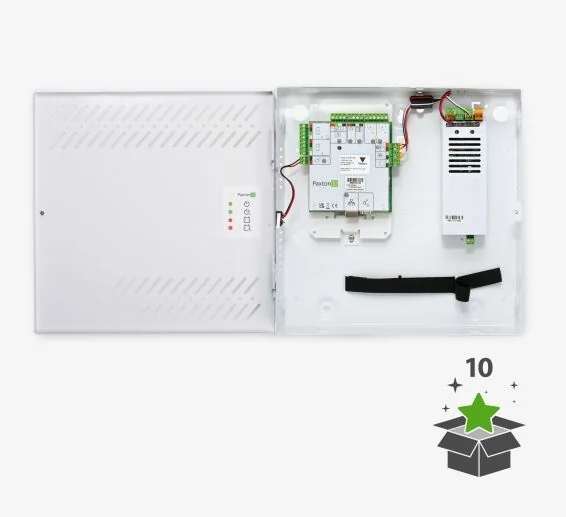
Current controller examples to compare
| Family | Examples | Selection questions |
|---|---|---|
| Paxton10 single-door | 010-522-US powered enclosure; 010-495-US metal PoE; 010-403-US PCB-only; 010-315-US plastic housing. | Lock load, PoE class, local power, battery, enclosure security, network path and service access. |
| Net2 Plus | 682-528-US plastic housing; 682-493-US ACU; 682-610-US metal powered enclosure; PoE+ and starter/expansion kits. | Existing Net2 compatibility, lock power, network topology, expansion strategy and enclosure environment. |
| Paxton10 connectors | Alarm 010-203-US; wireless 010-592-US; input 010-890-US; output 010-432-US; I/O 010-266-US. | Number and type of points, supervision, trigger/action logic, reset, timing, cable route and supported release. |
| Net2 I/O and wireless | Net2 I/O board and Net2Air bridge options. | Integration event, bridge placement, RF survey, device capacity, support status and takeover documentation. |
Opening-level connection diagram
Electrical and construction information required
- Lock voltage, current, duty cycle, fail-safe/fail-secure function and inrush.
- Power-supply rating, battery size, required standby time and shared loads.
- Cable type, conductor count, distance, pathway, fire rating and surge protection.
- Controller temperature, humidity, enclosure, tamper and service-clearance conditions.
- Door contact, REX, emergency release, fire alarm and accessibility interfaces.
- Network switch, address, VLAN, PoE class, UPS and naming standard.
Official Paxton product resources
Use Paxton-owned pages for current models, release notes, manuals, technical data and software access. Product availability and specifications can change.
Engineer the controller schedule
Send the opening list and existing hardware information. We can prepare a controller, power, I/O and network schedule tied to field conditions.
Build a complete controller and power schedule
A controller is only one part of an opening. For every door, the schedule should identify the controller model, enclosure, supply voltage, available current, standby battery, reader interface, lock load, request-to-exit input, door contact, fire-alarm behavior and network connection. Electrified panic hardware, automatic operators, delayed-egress devices and exterior gates require additional coordination beyond a typical strike or magnetic lock.
Power calculation
Calculate normal and alarm current for the controller and every powered field device. Include voltage drop, battery duration, charger capacity and the effect of releasing or energizing multiple locks at once.
Input and output map
Name each supervised input and controlled output. Record contact state, end-of-line supervision, alarm timing, shunt logic and what happens when a cable is cut or shorted.
Network and service access
Document switch, VLAN, addressing method, PoE or local power, surge protection and service clearance. Labels should match the drawings and the software door names.
Opening-level commissioning record
Testing should prove valid access, denied access, door-held and door-forced events, request-to-exit operation, lock timing, emergency release, controller restart and loss of communications. The final record should show the test result, technician, date and any exception that remains open. This turns a controller list into a maintainable access-control system.
Paxton owner, administrator and buyer resources
These owner and buyer guides connect Paxton software and hardware research with surveyed design, installation, commissioning, database protection, maintenance and field support in North and South Carolina.
Official Paxton software, firmware and support
Use these manufacturer-owned portals for current downloads, release notes, manuals, advisories and technical resources. 360 Technology Group links to official sources and does not copy or host firmware files.
Update carefully: confirm the exact model, region, hardware revision, installed version, prerequisites, required intermediate releases, support entitlement, integrations, backup, maintenance window, rollback limitations and post-update tests. The wrong package or sequence can interrupt service or prevent a downgrade.
Some portals require a customer, dealer, certified-technician or active-support login. Cloud-managed products may update automatically and may not offer a public firmware file.