
Authorized dealer · Certified installers · Charlotte, NC headquarters
Authorized dealer and certified installers — North and South Carolina
360 Technology Group is an authorized dealer and certified installer for the manufacturers we represent, and has been installing commercial security camera and video surveillance systems across North and South Carolina since 2018 — more than 8 years.
- Authorized dealer — genuine equipment, licensing and manufacturer support entitlement.
- Certified installers — factory-trained technicians handle the cabling, mounting, power, programming and commissioning.
- Repair, service and takeover — we maintain, repair, upgrade and take over existing systems.
- 24/7 emergency service — on-call service technicians for emergency repairs, plus scheduled preventive maintenance.
We cover every city in North Carolina and South Carolina from our Charlotte headquarters. Request a quote or service call Call 704-726-4254
Commercial security camera installation — North & South Carolina
Commercial security camera installation for Carolina businesses
360 Technology Group is a commercial security camera installation company based in Charlotte, North Carolina. We design, install, wire, configure and service business security camera systems across North and South Carolina — from a four-camera retail store to multi-building campuses with hundreds of cameras. We are the security camera installers, not a referral service: the same company that quotes the system pulls the cable, mounts the cameras, aims and focuses them, configures the recorder and comes back when something stops working.
We install and service IP camera systems, CCTV, network video recorders, cloud-managed video surveillance and hybrid systems from Avigilon, Axis, Hanwha Vision, Hikvision, Dahua, Verkada, Bosch, LTS, Arcules, FLIR and Milestone. Because we are an authorized dealer and certified installer for those lines, you get genuine equipment, real warranty entitlement and a manufacturer support path — not grey-market hardware with no recourse.
- New installations — design, cabling, mounting, recorder, network, configuration, testing and training.
- Replacements and upgrades — analog to IP, failing recorders, end-of-life cameras, resolution and low-light upgrades.
- Repair and service — dead cameras, cameras that stopped recording, lost remote access, failed drives, water ingress, PoE faults.
- System takeovers — we adopt, document and support systems another contractor installed or abandoned.
- Additions — extending an existing system rather than replacing it, where the platform still supports it.
What actually drives the cost of a security camera system
Camera price is the part buyers focus on and the smallest part of the number. On a typical commercial job the labor, cabling and infrastructure cost more than the cameras. These are the variables that move a quote:
Cable runs, not camera count
A camera 40 feet from the closet and a camera 280 feet across a warehouse with no pathway are the same camera and completely different jobs. Conduit, core drilling, lifts, ceiling type, plenum rating and whether the building is occupied drive labor more than anything else.
Retention
Thirty days at 4K on 32 cameras is a very different storage and licensing bill than 14 days at 1080p. Retention is usually the single biggest lever on recorder cost, and it is often set by an insurer, a franchise agreement or state regulation rather than by preference.
Cloud versus on-premise
Cloud-managed video surveillance removes the recorder and the port-forwarding headache but adds a per-camera subscription forever. On-premise costs more up front and less monthly. We will show you both numbers over five years instead of just the one that suits us.
Low light and problem scenes
Parking lots, loading docks, entrances shot into daylight and dark yards need specific cameras — not the same model repeated. Getting a usable face or plate at night costs more per camera and saves the entire system from being useless as evidence.
Network readiness
If the existing switches have no PoE budget, no spare ports or no UPS, that is part of your camera project whether the quote mentions it or not. We survey it before quoting rather than raising it as a change order.
Who monitors it
Recorded-only, self-monitored, or a video monitoring service with live operator verification and dispatch are three different budgets. Verified response has real value on sites with recurring after-hours theft.
How much does commercial security camera installation cost?
Standard commercial camera installation labor typically starts around $350 to $700 per camera, plus equipment and shared system infrastructure. A complete installed camera location — the camera, its cabling, mounting, configuration and its share of the recorder and network — commonly runs from $750 to more than $3,000, depending on the brand, the camera’s capabilities and the conditions at the site.
| System size | Typical installed cost |
|---|---|
| Four-camera commercial system | $4,500 – $9,000 |
| Eight-camera commercial system | $8,000 – $20,000 |
| Sixteen-camera commercial system | $16,000 – $40,000 |
| Enterprise, high-access or specialty systems | Site-specific pricing |
The $350–$700 per camera labor range applies to a standard indoor installation where a new network cable has to be run. Outdoor, high-ceiling and difficult-access installations typically cost more, because they may require weatherproof pathways, conduit, lifts, longer cable routes or more than one technician on site.
Camera equipment, recording infrastructure, software licensing and cloud subscriptions vary by manufacturer and are priced separately in the project proposal, so you can see what you are paying for hardware against what you are paying for labor and infrastructure.
These are real ranges, not a teaser price. We still survey the site before issuing a quote, because the difference between a camera 40 feet from the closet and one 280 feet across a warehouse is the difference between the bottom and the top of these ranges. What we will not do is quote low, win the job and recover the gap in change orders. See the full cost and design guide.
What a professional security camera installation includes
The difference between a professional installation and a cheap one shows up eighteen months later, usually the week you need footage. Our scope covers:
- Scene design first. Every camera gets a stated job — identify a face at the door, read a plate at the gate, observe the aisle — and a lens and mounting height chosen to actually achieve it. Coverage maps are produced before anything is ordered.
- Proper cabling. Cat6 or Cat6A run in appropriate pathway, correct bend radius, plenum where required, terminated, tested and labeled at both ends. Every drop is documented on a cable schedule.
- Power and protection. PoE budget calculated per switch, UPS on the recorder and head-end, and surge protection on exterior runs — Carolina lightning takes out more cameras than burglars do.
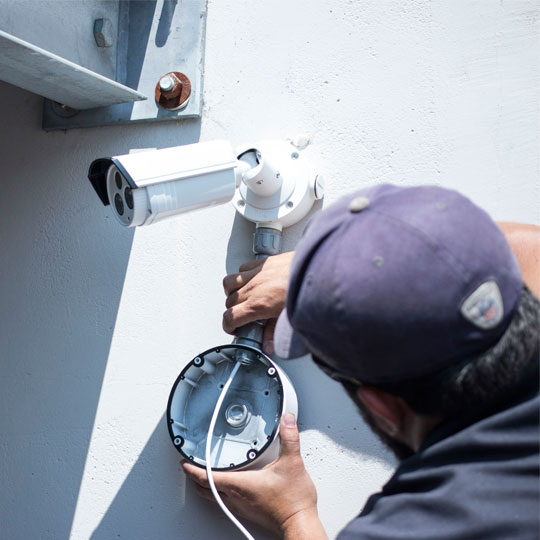
- Weather and mounting. Correct IP and IK rated housings, junction boxes, drip loops, stainless hardware on coastal sites, and mounts rated for the substrate rather than the nearest available fastener.
- Network segmentation. Cameras on their own VLAN, default credentials replaced, firmware current, remote access through the manufacturer cloud or VPN rather than an open port forward.
- Commissioning and evidence. Day and night acceptance images from every camera, retention verified against the actual recording settings, export tested, and health alerts configured so you learn a camera failed before you need it.
- Documentation and training. As-built drawings, camera schedule, IP list, credentials handover and training for the people who will pull footage at 6am.
Where we install
Charlotte and the surrounding metro — Huntersville, Cornelius, Davidson, Mooresville, Matthews, Mint Hill, Pineville, Concord, Kannapolis, Gastonia, Monroe, Indian Trail and Waxhaw — plus Rock Hill, Fort Mill, Lake Wylie and Tega Cay across the South Carolina line, are routine daily service areas. We also work statewide in both Carolinas, including Raleigh, Durham, Greensboro, Winston-Salem, Asheville, Wilmington, Columbia, Greenville, Spartanburg, Charleston and Myrtle Beach.
By facility type: warehouses and distribution centers, retail, schools, hotels, manufacturing plants, multifamily and property management, government facilities, construction sites and general commercial buildings. Related services: parking lot cameras, cloud-based cameras, video management software, remote video monitoring and access control.
Questions we get asked before a quote
Do you install security cameras for small businesses, or only large sites?
Both. A four-camera system for a single storefront is a normal job for us, and so is a 300-camera campus. The engineering discipline is the same; only the scale changes.
Can you repair or take over cameras someone else installed?
Yes. System takeovers are a large part of our service work. We document what is there, tell you honestly what is worth keeping and what is end-of-life, and support it from then on. You do not have to replace a system to get service.
How fast can you respond when cameras stop recording?
Our office is staffed Monday to Friday 8am to 5pm and we run 24/7 emergency service through on-call technicians. A system that has stopped recording is treated as an emergency, because every hour it is down is evidence you cannot recover.
Should I choose cloud cameras or a traditional recorder?
It depends on how many sites you have, your internet upload capacity, how long you must retain footage and whether you want a capital purchase or an operating subscription. Multi-site operators with modest retention usually come out ahead on cloud; single sites with long retention usually come out ahead on-premise. We model both before recommending.
Do you provide the cameras, or do I buy them myself?
We supply them. We are an authorized dealer for the lines we install, which means genuine hardware, full warranty and a manufacturer support path. We can work with owner-supplied equipment, but warranty and support then sit with you.
What internet upload speed do cloud cameras need?
It depends on camera count, resolution and whether the system uploads continuously or only on events. This is exactly the kind of thing we verify during the site survey — a cloud system sold onto an inadequate connection is the most common failure we get called to fix.
Get a fixed quote after a site walk
Send us the address, the building type and roughly what you need covered. We will schedule a site survey, confirm what the building already has, and give you a written scope and price — not a phone estimate.
Request a site survey Call 704-726-4254
Charlotte, NC headquarters · every city in North and South Carolina · office Monday–Friday 8–5 · 24/7 emergency service by on-call technicians.
Capabilities and selection checkpoints
The cards in this section summarize information to evaluate; they are not separate pages. Availability and compatibility can change, so final models and releases must be confirmed against current manufacturer resources.
Security Camera Installers
Treat this as a design checkpoint; the final selection depends on field conditions and supported releases.
Professional Security Camera Installation
Review compatibility, capacity, infrastructure and lifecycle implications with the complete system design.
Business Security Camera System Solutions
Confirm which current models, editions, licenses and dependencies support this requirement before procurement.
White Glove Service
Connect this capability to a named user workflow and a testable result at the actual facility.
Large and Localized
Compare retained equipment, migration effort, subscription impact and replacement options for this topic.
Plan the right system for the site
Treat this as a design checkpoint; the final selection depends on field conditions and supported releases.
Image objective
Document who configures, tests, administers and supports this function after the project is accepted.
Recording architecture
Document who configures, tests, administers and supports this function after the project is accepted.
Network design
Document who configures, tests, administers and supports this function after the project is accepted.
Analytics use
Document who configures, tests, administers and supports this function after the project is accepted.
Privacy and evidence
Confirm which current models, editions, licenses and dependencies support this requirement before procurement.
Lifecycle support
Connect this capability to a named user workflow and a testable result at the actual facility.
Evidence to collect before design
A useful survey and stakeholder review should produce the following project evidence for Security Camera Installation:
- Scene objectives for every camera, including identification detail, direction of travel and operating hours.
- Day, night, backlight, glare, weather, vibration, privacy and mounting conditions at each location.
- Retention period, recording mode, resolution, frame rate, failover and export requirements.
- PoE load, switching, uplinks, bandwidth, storage, remote access and network-security constraints.
- VMS, analytics, access control, alarm, intercom and third-party integration expectations.
- User permissions, evidence handling, health monitoring, software support and replacement planning.
Architecture and integration review
Image objective
Specify the event and visual detail the camera must capture instead of selecting resolution in isolation.
Recording architecture
Calculate storage, retention, failover and export needs for the complete camera count.
Network design
Validate PoE, bandwidth, segmentation, time services, remote access and monitoring with IT.
Analytics use
Connect each analytic to a response workflow and test it under representative site conditions.
Privacy and evidence
Document viewing rights, exports, retention, audit history and applicable organizational policy.
Lifecycle support
Track model status, firmware, VMS compatibility, licenses, warranties and replacement options.
Compare proposals on the same evidence
Product names and device counts do not make competing proposals equivalent. Ask each bidder to identify assumptions, exclusions, supported versions, owner responsibilities and the proof that will be delivered at acceptance.
| Comparison area | Evidence a complete proposal should provide |
|---|---|
| Fit for the operating need | A written explanation of how Security Camera Installation supports the required users, events and workflows. |
| Compatibility | A supported-parts, software, license and integration matrix tied to the proposed architecture. |
| Infrastructure | Documented power, network, pathways, environmental and owner-furnished dependencies. |
| Acceptance | Named tests, expected results, exception handling and responsibility for correcting deficiencies. |
| Lifecycle | Current support status, update approach, warranty, subscriptions, spares and replacement planning. |
Deployment and acceptance sequence
- Discovery: agree on users, operating outcomes, retained systems, constraints and acceptance criteria.
- Field validation: verify dimensions, infrastructure, environmental conditions, pathways, power, network and integration points.
- Documented design: name the architecture, supported components, licenses, responsibilities, assumptions and change process.
- Staging and implementation: prepare configuration, backups, labels and test scripts before controlled field deployment.
- Operational acceptance: exercise normal use, exceptions, outages and recovery; then deliver training and system records.
Software, firmware and lifecycle responsibility
Record the installed model, hardware revision, software or firmware release, license or subscription, warranty and administrator ownership at handoff. Those details make later troubleshooting and upgrade planning materially safer.
Downloads, release notes, advisories and manuals should come from the manufacturer’s official portal. 360 Technology Group links to official resources and does not host firmware files locally. Some portals require an authorized customer, dealer or support entitlement.
Before any update, confirm the exact model and region, prerequisites, supported intermediate releases, backup, maintenance window, integration compatibility, rollback limits and post-update test plan. Cloud-managed products may control release timing differently from locally managed systems.
Turn every camera into a written image objective
A camera schedule should state whether each view is intended to detect activity, observe behavior, recognize a known person, identify an unknown person, read a license plate or document a transaction. Those are different design objectives. The lens, distance, mounting height, angle, lighting, resolution and shutter settings should be selected from the objective rather than from a generic megapixel target.
Day and night proof
Capture acceptance images at representative daytime and nighttime conditions. Test backlight, headlight glare, shadows, IR reflection, rain and motion—not only a still daytime scene.
Retention calculation
Calculate storage from camera bitrate, frame rate, codec, scene activity, recording schedule and required retention. Include overhead, RAID or appliance behavior and export capacity.
Evidence workflow
Define who can view, search, bookmark, export and share video. Test timestamps, watermarks or signatures, playback tools and the chain-of-custody process.
Installation details that affect long-term reliability
Document mounting hardware, penetrations, drip loops, junction boxes, surge protection, network switch and port, PoE budget, VLAN, address, time source and weather sealing. Exterior mounts should be coordinated with roofing and building-envelope requirements. Cameras should be labeled consistently in the VMS, drawings, switch records and field.
Final commissioning should include focus, field of view, privacy masks, analytics, audio policy, user roles, health alerts, failover or edge recording, configuration backup and owner training. The handoff package should identify the approved manufacturer support portal and the process for evaluating future firmware—not merely provide a password.
Commission the viewing experience, not only the cameras
Operator workstations and mobile clients should be tested with the expected number of simultaneous streams, monitors and searches. Confirm that users can find the correct camera from maps and names, move from an alarm to associated video, export an incident and replay it on an approved viewer. Health monitoring should identify camera loss, storage trouble, time drift and server faults with an owner-defined response path.
Training should use the customer’s actual views and incident scenarios. Record which roles may use audio, analytics, privacy masks, exports and shared links so system capability does not silently become unauthorized practice.
Build a project-specific comparison
Share the facility type, Carolina location, existing platform, approximate device count, operating problem, required integrations and target schedule. 360 Technology Group can use that context to determine whether Security Camera Installation deserves a detailed site and design review.
Commercial camera installation cost and design
Use this practical buyer guide to prepare scope, compare proposals and connect research with surveyed installation, commissioning, maintenance and repair in North and South Carolina.
IP security camera installation, step by step
An IP security camera installation is a network job as much as a mounting job. Each camera is a small computer on your network with an address, drawing power over the same cable that carries its video. Treated properly that is a large improvement; treated carelessly it is how a camera becomes the weakest device on a business network.
How we run one:
- Survey first. What each camera is for, at what distance, in what light. Pixels per foot at the target decides whether an image identifies a person or merely proves one existed.
- Cable and power. Cat6 to each device, terminated and tested, with results recorded. A PoE switch with enough total wattage — not just enough ports, which is the failure that makes cameras reboot at night when the infrared comes on.
- A separate VLAN. Cameras belong on their own network segment, away from workstations and card payments. Free if decided at the start.
- Recording and retention. Fourteen days suits most incidents; thirty to ninety where insurance or licensing requires it, which roughly doubles storage.
- Commissioning and handover. Focus, exposure and analytics set on site, plus logins that belong to you and documentation you keep.
IP camera installation across the Charlotte metro and the Carolinas — new systems, expansions, and repair or takeover of existing installations.