
Authorized dealer · Certified installers · Charlotte, NC headquarters
360 Technology Group is an authorized LenelS2 dealer and certified installer
We have been selling, installing, programming and servicing LenelS2 systems across North and South Carolina since 2018 — more than 8 years. Our scope covers LenelS2 OnGuard and OnGuard Cloud, NetBox and NetBox Nodes, M-Series controllers, BlueDiamond readers and mobile credentials.
- Authorized LenelS2 dealer — we quote and supply genuine LenelS2 equipment, licensing and subscriptions.
- Certified LenelS2 installers — our technicians install, wire, program, commission and document the system.
- Repair and takeover — we service, troubleshoot, expand and take over existing LenelS2 installations we did not originally install.
- 24/7 emergency service — on-call service technicians for emergency repairs, plus scheduled preventive maintenance.
We cover every city in North Carolina and South Carolina from our Charlotte headquarters. Request a quote or service call Call 704-726-4254
OnGuard field-hardware guide
Mercury M-Series controllers and BlueDiamond credential migration
Current hardware selection begins with M-Series controller architecture, then matches downstream boards, enclosures, reader communication, credential technologies, lock power and lifecycle acceptance to each opening.
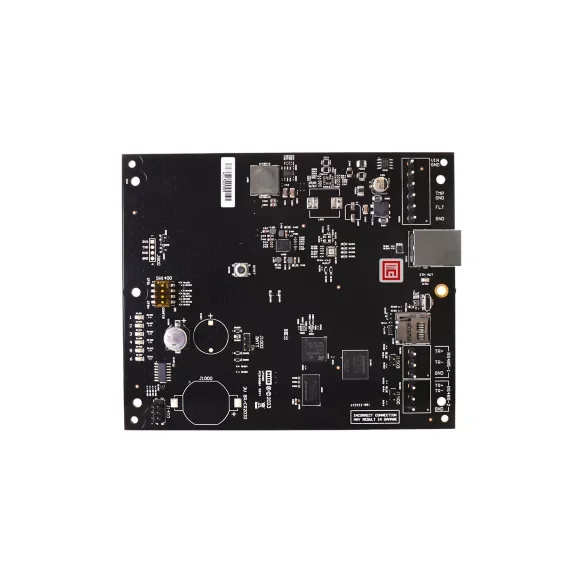
M-Series is the current controller direction
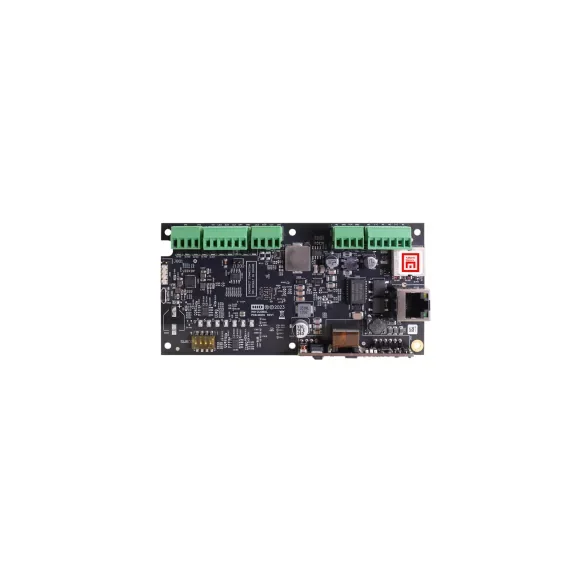
The current M-Series family includes four configurations: M2210, M2220, M3300 and M4420. They vary in reader ports, badge memory, power input and downstream expansion communication. A model name without the associated downstream-board, enclosure and power schedule is not a complete design.
M-Series improves controller cybersecurity and lifecycle capabilities with Secure Boot, modern processors, TLS support, cryptographic acceleration and optional communication resilience. Legacy mode can help migration, but it should be a controlled transition state with a documented end condition.
| M-Series area | Current manufacturer information | Project implication |
|---|---|---|
| Controller family | M2210, M2220, M3300 and M4420 configurations address different reader ports, memory, power and downstream-bus needs. | Select from a controller and expansion schedule, not a generic panel allowance. |
| Network security | TLS 1.3 is the default; TLS 1.2 is also supported. The family adds Secure Boot, crypto acceleration and data-at-rest protections. | Confirm current OnGuard release, certificates, accounts, encryption settings, switch ports and cybersecurity acceptance. |
| Reader communication | Onboard ports support OSDP Secure Channel plus legacy interfaces such as Wiegand where applicable. | Prefer supported OSDP Secure Channel for new readers and document any legacy interface as a migration constraint. |
| Networking | All models include 10/100 Ethernet with IPv4 or IPv6; an optional second Ethernet port supports resilient designs. | Document the exact redundancy method, routing, VLAN, addressing, time, monitoring and failure tests. |
| Expansion | Current options support reader, input and output boards plus an eight-port RS-485 multiplexer. | Count downstream address limits, cable distance, enclosure space, power, batteries and spare capacity. |
| Continuity | Distributed databases and locally stored schedules/actions support controller decision-making when upstream services are unavailable. | Test server, communication-server and network interruptions with recorded expected behavior. |
Controller-to-opening connection
Drawing requirement: show controller and board part numbers, downstream addresses, cable and distance, reader interface and address, power and batteries, lock suppression, inputs, outputs, fire-alarm release and network switch ports.
BlueDiamond readers and credentials
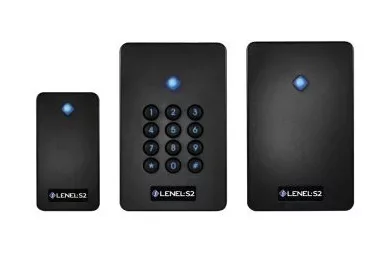
BlueDiamond readers provide a migration path among selected proximity cards, smart cards, Bluetooth credentials and current NFC wallet-based credentials. They can support standard reader output protocols and are used with OnGuard, NetBox and other supported platforms.
The project should identify which credential technologies remain active at each phase. Keeping every legacy format enabled indefinitely can preserve the weakest credential risk. Plan issuance, enrollment, user communication and final retirement of older technologies.
| BlueDiamond item | Published reference | Design check |
|---|---|---|
| Reader formats | Mini-mullion, standard single-gang and standard reader with PIN pad. | Match mounting surface, accessible reach, credential policy and environmental exposure. |
| Physical size | Mini reader approximately 3.8 x 2.1 x 0.8 inches; standard models approximately 4.2 x 3.0 x 0.8 inches. | Verify backbox, mullion width, adjacent metal, cable entry and finish. |
| Environment | Published range -31 to 149 degrees F, 0 to 100% RH non-condensing and IP65. | Confirm exact model, seal, mounting, sunlight, water path and local environmental conditions. |
| Power | 10 to 16 VDC; typical and peak current vary by form factor and keypad. | Use the exact data sheet for panel/reader power and standby battery calculations. |
| Interfaces | OSDP, OSDP V2, Wiegand and supported supervised F/2F are published; support depends on the reader label/model. | Record the selected interface, address, secure-channel state, firmware and cable topology. |
| Credentials | Supports selected proximity and 13.56 MHz smart cards plus Bluetooth/NFC mobile credential workflows. | Identify every retained and future credential technology and the point at which insecure legacy formats can be disabled. |
| Reference read range | Up to about 4 inches for applicable RFID cards and up to 30 feet for Bluetooth under published conditions. | Commission actual read behavior at the opening; reduce unintended long-range activation and adjacent-reader interaction. |
Mobile and wallet credential workflows
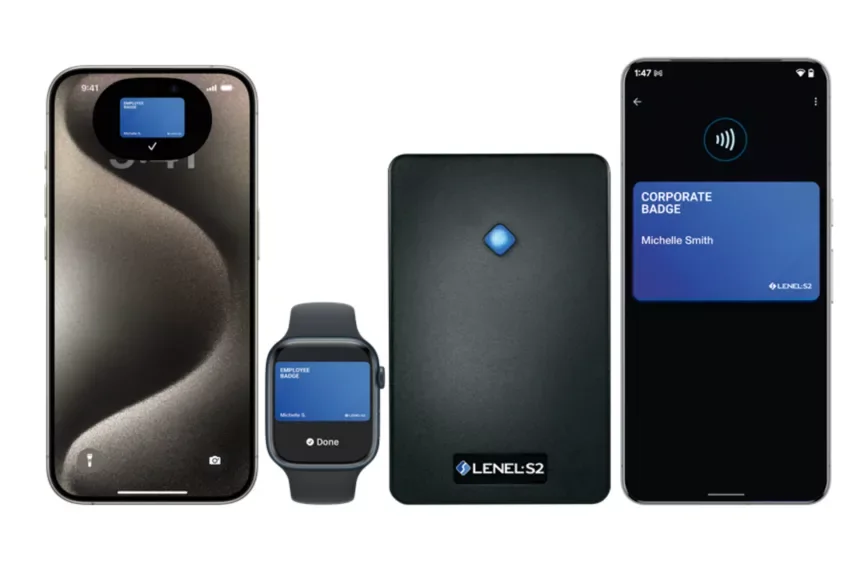
BlueDiamond offers Bluetooth mobile credentials and current wallet-based NFC solutions for Employee Badge in Apple Wallet and Corporate Badge in Google Wallet in supported North American OnGuard and NetBox deployments. Compatibility depends on platform version, reader firmware, credential service, device and current manufacturer entitlement.
Define alternatives for people without compatible devices. Separate the user credential from administrative mobile applications, and document lost-device response, reissue, revocation and privacy expectations.
Mobile-enabled versus retired mobile-ready
LenelS2 published a November 2024 lifecycle notice for BlueDiamond Mobile Ready Readers. Confirm the exact suffix, label and licensing state of every installed reader.
OSDP file transfer
Applicable current readers can receive supported firmware/configuration through OSDP workflows. Use manufacturer tools, backups and post-update tests.
Wallet migration
Validate platform release, NFC support, reader firmware, issuance service, phone/watch models and administrator procedure in a pilot group.
Physical credential migration
Inventory proximity, iCLASS, MIFARE and DESFire populations; document keys, formats, encoders and the cutover sequence.
PIN pad
Use PIN only under an approved multifactor or operating policy with privacy, reset, duress and accessibility considerations.
Long-range Bluetooth
Commission range at the real opening to prevent adjacent-door activation and unintended early credential presentation.
Lifecycle and acceptance checklist
- Do not specify retired Mercury X-Series controllers as the default current platform; inventory them for supported migration.
- Confirm every M-Series controller, downstream board, enclosure, power supply, battery and firmware.
- Verify OSDP Secure Channel state or document the reason for a legacy reader interface.
- Test valid, denied, disabled, expired, anti-passback and emergency credential behavior.
- Test mobile and wallet issuance, use, lost device, replacement, revocation and no-phone alternatives.
- Exercise server, controller, downstream bus, reader, network and power failures.
- Deliver controller and reader configuration records, credential technologies, firmware, diagrams, test results and lifecycle ownership.
Official LenelS2 product and support resources
Use current Honeywell and LenelS2 pages for product data, lifecycle notices, release information, supported combinations and authorized downloads. Software, firmware and some technical documents require an entitled portal account; 360 Technology Group does not host those files locally.
Build a current LenelS2 hardware schedule
We can survey existing panels, readers and credentials and design a staged M-Series and BlueDiamond migration for Carolina facilities.
LenelS2 owner, administrator and buyer resources
Use these owner and buyer resources to connect platform, product and pricing research with surveyed design, installation, software setup, commissioning, maintenance and support in North and South Carolina.
Official LenelS2 OnGuard software, firmware and support
Use these manufacturer-owned portals for current downloads, release notes, manuals, advisories and technical resources. 360 Technology Group links to official sources and does not copy or host firmware files.
Update carefully: confirm the exact model, region, hardware revision, installed version, prerequisites, required intermediate releases, support entitlement, integrations, backup, maintenance window, rollback limitations and post-update tests. The wrong package or sequence can interrupt service or prevent a downgrade.
Some portals require a customer, dealer, certified-technician or active-support login. Cloud-managed products may update automatically and may not offer a public firmware file.